The Java ecosystem is built on several foundational components that together make Java applications possible. Among these components, three acronyms consistently surface: JVM, JRE, and JDK.
They are often mentioned together, sometimes interchangeably, which can lead to confusion among new learners. However, each plays a distinct and essential role in the Java platform. Understanding these differences is not only important for learning Java but also vital for configuring development environment, deploying Java applications, and troubleshooting performance or compatibility issues.
What is the JVM (Java Virtual Machine)?
The Java Virtual Machine (JVM) is an abstract computing machine that enables Java bytecode to run on any device or operating system. The JVM sits at the heart of the Java philosophy: “Write Once, Run Anywhere.” When developers write Java code, they write it in .java files. These source code files are compiled by the Java compiler (javac) into bytecode, a platform-independent intermediate representation stored in .class files.
The JVM interprets this bytecode into native machine instructions specific to the underlying hardware.
The JVM is responsible for:
- Bytecode Execution:
The JVM reads and executes bytecode instructions, converting them into platform-specific machine code. Early JVMs used pure interpretation, but modern JVMs typically use Just-In-Time (JIT) compilation to improve performance.
- Memory Management:
The JVM manages memory automatically through:
- Heap (for objects)
- Stack (for call frames)
- Method Area (class metadata)
- Garbage Collection (GC)
Java’s automatic garbage collection is one of its major functions.
- Security
The JVM includes a bytecode verifier ensuring that malicious or corrupted bytecode does not crash the system or access unauthorized resources. This helped Java succeed in early web applets and continues to secure server-side applications.
- Platform Independence
Java’s platform independence is achieved because developers do not compile directly to machine code. Instead, bytecode runs on any JVM implementation. The JVM is built differently for Windows, macOS, Linux, or ARM processors, but the Java bytecode remains the same.
A typical JVM implementation includes:
- Classloader Subsystem
- Loads, links, and initializes classes.
- Runtime Data Areas
- Heap, Stack, Method Area, PC register, Native Method Stack.
- Execution Engine
- Interpreter
- JIT compiler
- HotSpot optimization
- Native Interface
- JNI (Java Native Interface)
- Native Libraries
What is the JRE (Java Runtime Environment)?
The Java Runtime Environment (JRE) is a package that provides everything needed to run Java applications but not compile or develop them. It contains the JVM plus essential libraries and files required for execution.
JRE = JVM + Java class libraries + supporting files
If only need to run Java programs (e.g., running a server app, playing a Java game, executing Java-based tools), the JRE is technically sufficient.
The JRE typically includes:
- Java Virtual Machine (JVM)
As explained earlier, this is the engine that executes Java bytecode.
- Core Java Class Libraries
These are essential packages such as: java.lang, java.util, java.io, java.net, java.math, javax.* (in older Java versions)
These libraries provide foundational functionality like I/O, networking, data structures, math, concurrency, and more.
- Supporting Files and Configuration
These include:Property files, Security policy files, Configuration files for networking, certificates, etc.
- Java Plug-in (Old versions)
Used for running Java applets in browsers—now deprecated.
- Java Web Start (Deprecated)
Used for launching applications from the web.
When is the JRE used?
- Running already-compiled applications
- End-user environments (client machines)
- Running enterprise applications on servers
- Containers or lightweight deployments where development tools are unnecessary
What is the JDK (Java Development Kit)?
The Java Development Kit (JDK) is a complete software development kit used to build Java applications. It includes everything the JRE has, plus tools and utilities for developers.
In simple terms:
JDK = JRE + Development Tools (compiler, debugger, etc.)
If you want to write Java code, compile it, debug it, or create libraries, you need the JDK.
The JDK consists of the following tools:
- Java Compiler (javac)
Converts .java files into .class bytecode files.
- Java Archive Tool (jar)
Packages multiple .class files into JARs.
- Java Debugger (jdb)
Helps find and fix runtime errors.
- Java Documentation Tool (javadoc)
Generates HTML documentation from source code comments.
- JVM Monitoring and Profiling Tools
Contains tools to monitor different resources used by the the java application like jconsole, jps, jstack, jmap, mission-control (in some distributions) etc.
- Java Launcher (java)
Used to start JVM execution for a Java program.
- Source Code Libraries
Include sample code and demo projects.
- Packaging and Deployment Tools
Such as the newer jpackage in modern JDKs.
Over the years, multiple vendors have released their own JDK distributions. The top vendor currently are: Oracle JDK, OpenJDK, Amazon Corretto, Adoptium Temurin, Zulu JDK, Red Hat OpenJDK
Today, most are functionally compatible with OpenJDK standards.
When do you need the JDK?
- Writing new Java programs
- Compiling Java code
- Building mobile apps with Android (uses a specialized JDK)
- Developing server-side applications with frameworks like Spring Boot
- Running integrated development environments (IntelliJ, Eclipse, NetBeans)
Relationship between JVM, JRE, and JDK
A useful way to visualize their relationship is using a nested hierarchy:
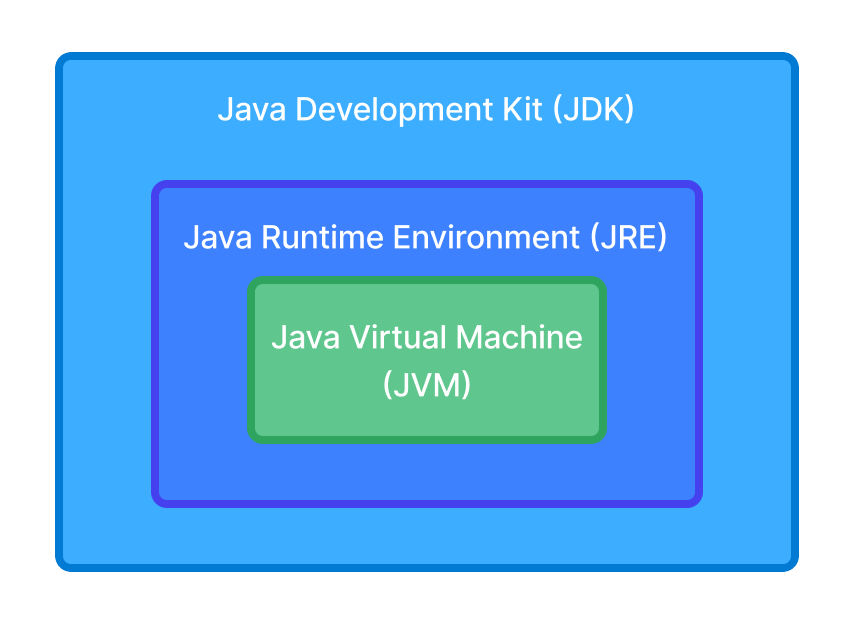
Summary:
- The JVM is the core that executes bytecode.
- The JRE contains the JVM + libraries needed to run Java code.
- The JDK contains the JRE + tools needed to develop Java code.
Conclusion
Understanding the roles of the JVM, JRE, and JDK is essential for mastering Java development. While the JVM is the execution engine responsible for interpreting bytecode and managing memory, the JRE serves as the environment that houses the JVM along with core libraries needed to run applications. The JDK, on the other hand, is the comprehensive toolkit for developers; it not only includes the JRE but adds compilers, debuggers, and various development utilities.
These components form a layered architecture: the JDK contains the JRE, which contains the JVM. This structure allows Java to remain both developer-friendly and platform-independent. As Java evolves, some distinctions (like standalone JREs) may blur, but the conceptual differences remain foundational.